

Advance Funds lets organizers request part of their ticket sales before the event takes place. It's your own ticket sales, released early for a fee. It isn't a loan, there's nothing to repay, and there's no credit check. You choose how much to request and how quickly you want it, and the full amount you request goes to your bank. Advance Funds is available to eligible organizers. Contact EVENT Live to have it turned on for your account.
Why Advance Funds Matters
💸 Cover costs before the doors open: pay deposits, artist fees, and production costs from sales you've already made.
🙌 Your money, not a loan: no credit check, no interest, and nothing to repay.
⚡ Choose your speed: Fund Now arrives in 0–1 business days, and Lightning Fund arrives within hours.
🎯 Get exactly what you ask for: the fee comes off your remaining balance, not the payment, so your bank receives the full amount.
↩️ Change your mind for free: cancel any request before the money is sent, with no fee.
📈 Grows with your sales: the more tickets you sell, the more you can request.
How to Request Funds
First, if Advanced Fund is not enabled yet for your Organization or has not been previously enabled/configured, you will need to reach out to EVENT Live.
If that has been previously enabled/configured, please proceed to the steps below.
From your event, go to Financials > Overview and click Request Funds.
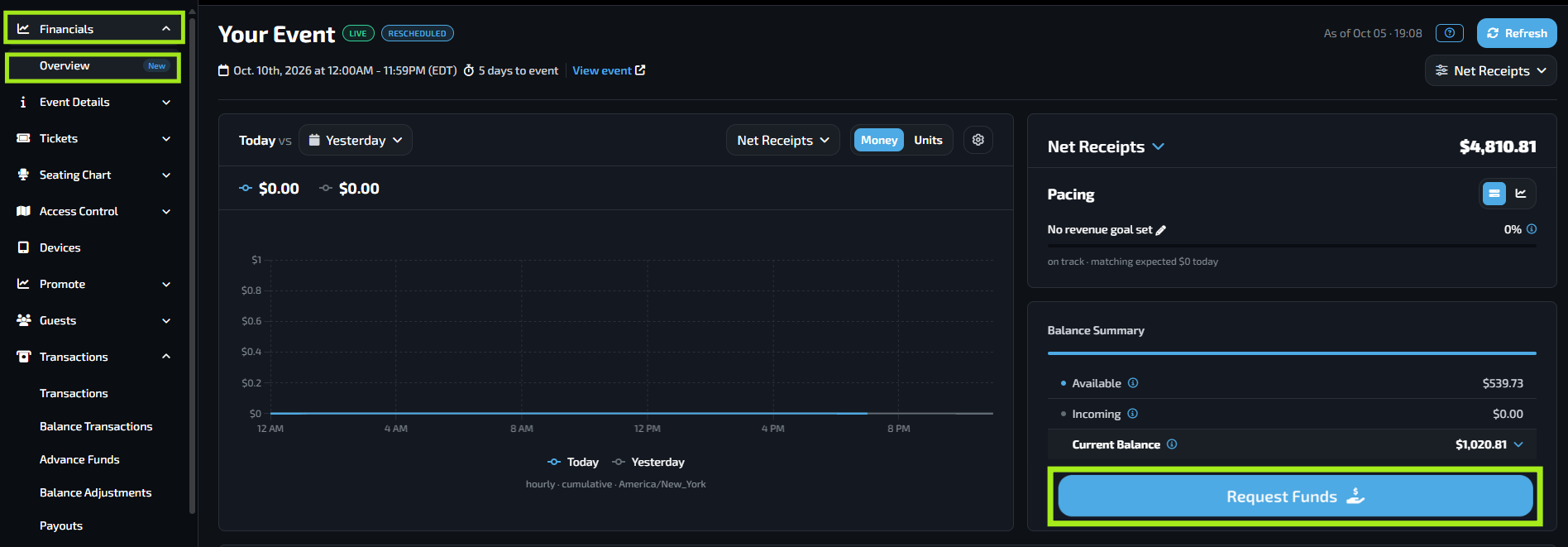
You'll also find a Request Funds button on Transactions Tab > Advance Funds > Request Funds.
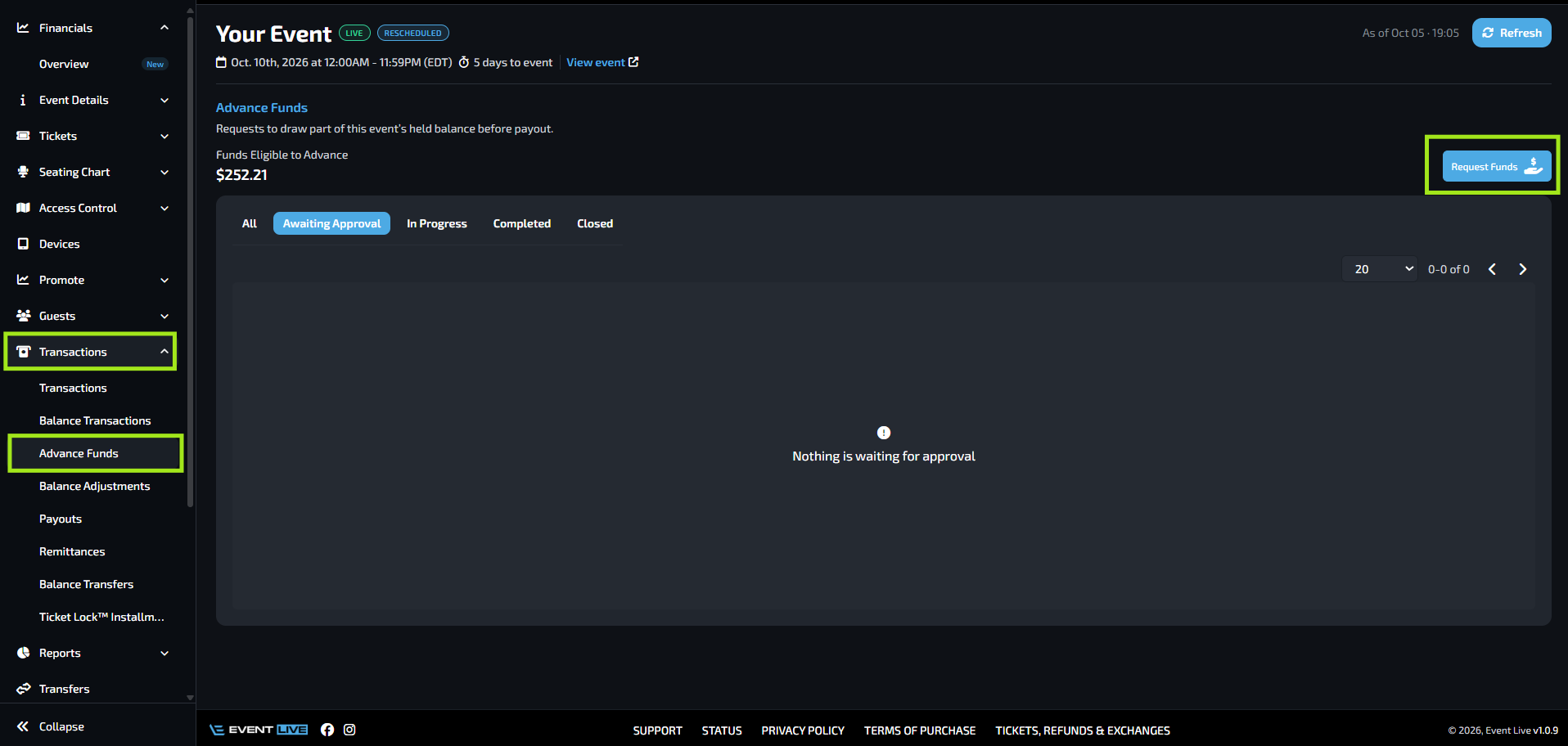
If something is stopping you from requesting, the screen tells you what it is and what to do. For example, it might say you need to verify your payout account, how far you are from the minimum balance, or the date you can request again.

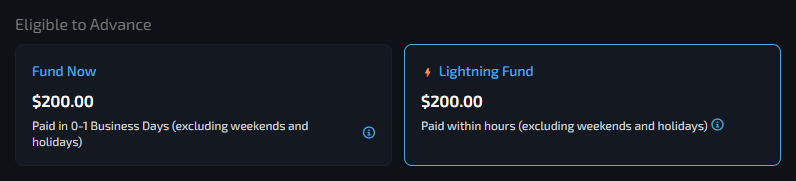
Under Eligible to Advance, select one of the two cards. Each card shows the most you can request with that option.
Fund Now: paid in 0–1 business days, excluding weekends and holidays. This option usually lets you request the most.
Lightning Fund: paid within hours, excluding weekends and holidays, up to $9,900 per request. This is selected automatically when it's available to you.
Drag the slider to the amount you need. It moves in $100 steps and starts at the most you can request. You receive shows the exact amount that will reach your bank.

Open these sections to see more about your request.
Fee: what this request costs. The fee is charged separately against your remaining balance, so your bank still receives the full amount.
Terms: your Available Funds and your Funds Eligible to Advance for the option you selected.
Tick the box to agree to the Advance Funds terms and conditions. Click the link beside it to read the Full Advance Funds terms and conditions
Track Your Request
Your request appears in the Advance Funds list with its status, such as Awaiting approval, In Progress, Completed, and Closed.
Use these tabs to filter your Advance Funds based on the status.

Can be cancelled: Submitted, Awaiting approval, Scheduled, and Awaiting payout account
Can't be cancelled: Releasing, Released, and Funded, because the money is already on its way to your bank
What happens when you cancel: there's no fee, and the amount goes straight back into what you can request. You can make a new request right away, and cancelling doesn't restart the waiting period between requests.

What to Do After You Request
After you submit a request, keep an eye on its status in your Advance Funds list. We'll also email you each time the status changes. Here's what each status means for you:
Awaiting approval — No action needed. EventLive is reviewing your request, and we'll email you once it's approved. If you change your mind, you can still cancel it.
Scheduled — No action needed. Your request will be sent automatically. You can still cancel it if you no longer need the funds.
Awaiting payout account — Action needed. Go to Merchant settings and add and verify a bank account so we can send your funds. Do this within 7 days, or the request will close and you'll need to submit a new one.
Releasing — No action needed. Your funds are being sent. You can no longer cancel at this point.
Released — No action needed. Your funds are on their way. Watch your bank account for the deposit. Fund Now arrives in 0–1 business days, and Lightning Fund arrives within hours, excluding weekends and holidays.
Funded — You're all set. Your bank has confirmed the deposit.
Rejected — Check your email to see whether EventLive included a reason. No fee was charged, and you can submit a new request.
Cancelled — No action needed. No fee was charged, and you can submit a new request right away.
Failed — Check your email for details. No funds were sent, or they were returned to your balance, and no fee was charged. You can submit a new request.
FAQs
Is Advance Funds a loan?
No. Advance Funds allows you to request money based on your event's sales and revenue, it simply is like getting advance payout for a small fee. There's no credit check, no interest, and nothing to repay.
How much can I request?
You can request a share of your event's cleared balance. The most you can request right now appears as Funds Eligible to Advance on the request screen.
Why is my Funds Eligible to Advance lower than my Available Funds?
A portion of your balance is held as cover for refunds and chargebacks, and you can request a share of what's left. Any requests that are still in progress also count against this amount. None of this is a fee, and you don't lose any of it. It's released through your normal payout after the event.
Why does my Funds Eligible to Advance change when I switch between Fund Now and Lightning Fund?
Each option has its own limit, and the amount shown is for the option you've selected. Fund Now usually lets you request more.
Why can I only request $9,900 with Lightning Fund?
Lightning Fund has a limit of $9,900 per request. If you need more, choose Fund Now instead. It arrives in 0–1 business days.
Why did my balance go down by more than I requested?
The fee is charged separately against your remaining balance rather than taken out of the payment. That way, your bank receives exactly the amount you requested.
Can the fee come out of the payment instead?
No. Every request works the same way, so the amount that reaches your bank always matches what you asked for.
I can't see the Advance Funds tab or the Request Funds button. Why?
Advance Funds may not be turned on for your account yet, or your role may not have access to it. Contact EventLive and we'll help.
Why can't I submit a request?
The request screen tells you what's stopping you and what to do. For example, you may need to verify your payout account, reach the minimum balance, or wait until the date shown before requesting again.
Can I cancel a request?
Yes, from your Advance Funds list, any time before the funds are sent. There's no fee, and you can request again right away.
What happens if my event is cancelled after I've requested funds?
If your remaining balance doesn't cover the refunds owed to your customers, EventLive will invoice you for the difference. This is part of the Advance Funds terms you accept with each request.