

Cymbal is a marketing and audience platform that accepts event, order, and contact data from partners like EVENT Live. To connect it, you'll need an API Key generated from the Cymbal Manager — this key is sent with every request EVENT Live makes to Cymbal's Partners API.
How To Get Your Cymbal API Key
Go to manager.cymbal.co and make sure your organization is set up. If you're a new Cymbal customer, you'll need to create this first.
Within the Manager, navigate to Settings → Integrations (manager.cymbal.co/settings/integrations).
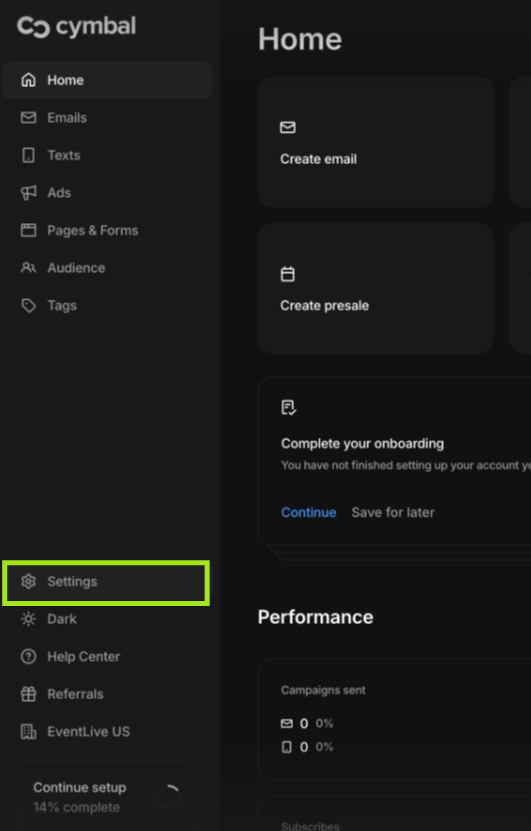
Click the Connect with a Ticketer Tab and select EVENT Live.

Copy the generated key somewhere secure. This is the exact value you'll paste into the Setup screen for Cymbal in EVENT Live's Integrations tab.
Back in EVENT Live, under Promote → Integrations, click Setup next to Cymbal and paste in the API Key.
Refer to "Setting Up Integrations" Article: Connecting an Integration Provider, Step 4.
If your API requests start returning a 403 error, your key has likely been revoked or is invalid — go back into the Cymbal Manager and generate a new one, then update it in EVENT Live.
Cymbal's authentication is a single API Key, scoped to your organization and generated from Settings → Integrations in the Cymbal Manager. It's passed in every request under the header Cymbal-Partner-API-Key. The setup is straightforward — the only prerequisite is having an active Cymbal organization already created.