

Private sale links let you sell selected tickets only to people who have the link. You create links in groups called Link Sets, then share each link with the buyers you choose.
You can use private links for both newly created products and existing products.
Why Private Sale Link is Important
Private links put you in control of who can buy. Only people with a link can see and purchase the tickets you choose, so they stay hidden from the public event page.
This makes private links useful for:
Presales and early access for members, past attendees, or email subscribers.
VIP, sponsor, and guest tickets that should not be on public sale.
Group or partner sales where each partner gets their own set of links.
Special pricing by pairing links with a discount or unlock code.
Because each link can expire, be one-time use, or be revoked at any time, you can stop tickets from being shared further. The Download CSV and Export Private Link Report options also show exactly which links were used and which orders came from them.
How to Setup a Private Link
New product: While creating the product, click the Private option under Ticket Access.
Refer to this link on how to create a product/ticket
Existing product: First make sure the product is not in the any of Ticket channels like Web, POS or Box Office channels. Then go to the Tickets tab, find the ticket, click Edit, and select Private under Ticket Access.
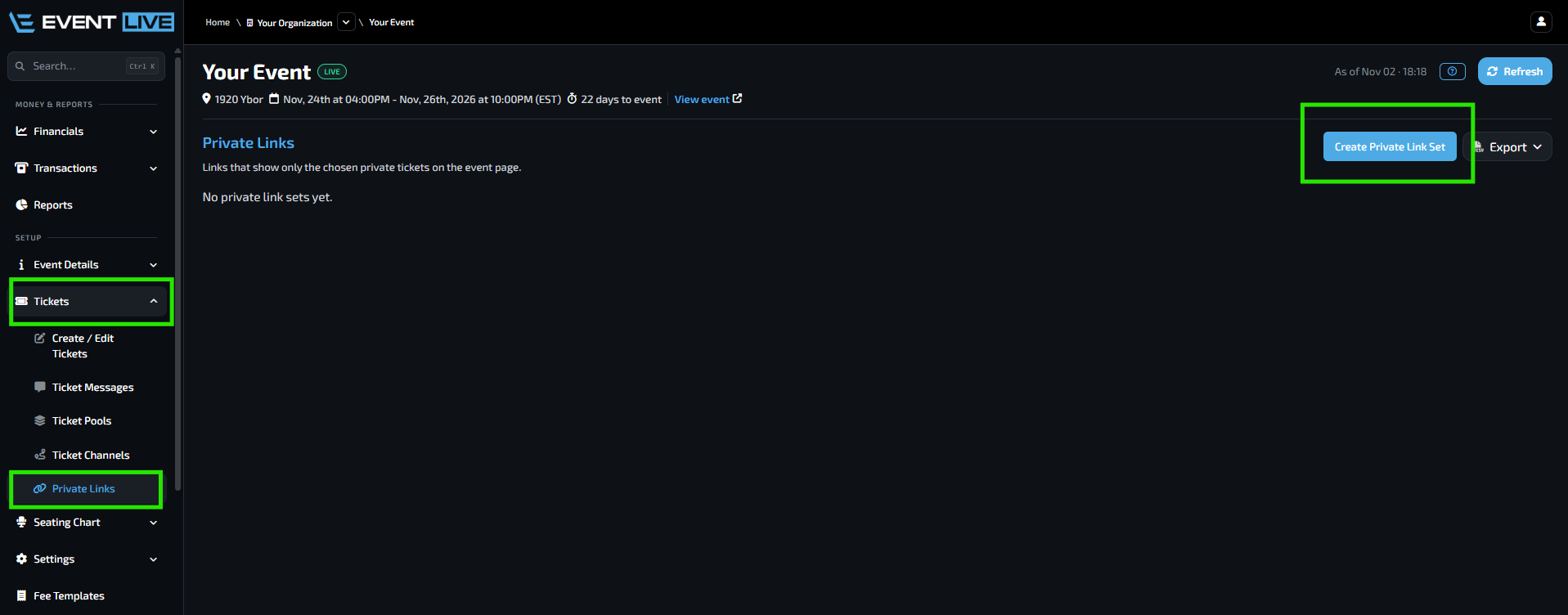
Link Set Name: A Link Set works like a folder that holds up to 100 links. Give it a name you will recognize.
Products: From the dropdown, select the products buyers will see when they open a link.
Expiration Date: The date the links stop working and can no longer be opened.
Number of Links: How many links you need, up to 100.
You can choose to Credit Sales to this Code, Apply the Discount at Checkout, or Unlock locked tickets. Once added, the code shares the same link as the private sale.
Tick One-time use if a link should stop working after one order is placed.
Leave it unticked if a link should keep working for many orders.
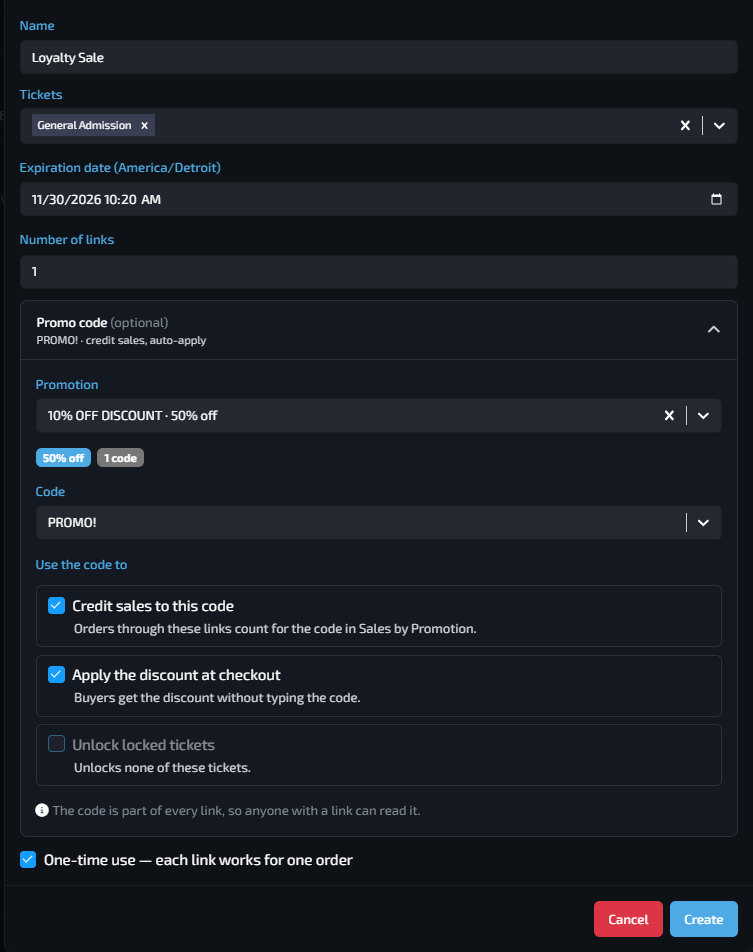
Manage your Private Links
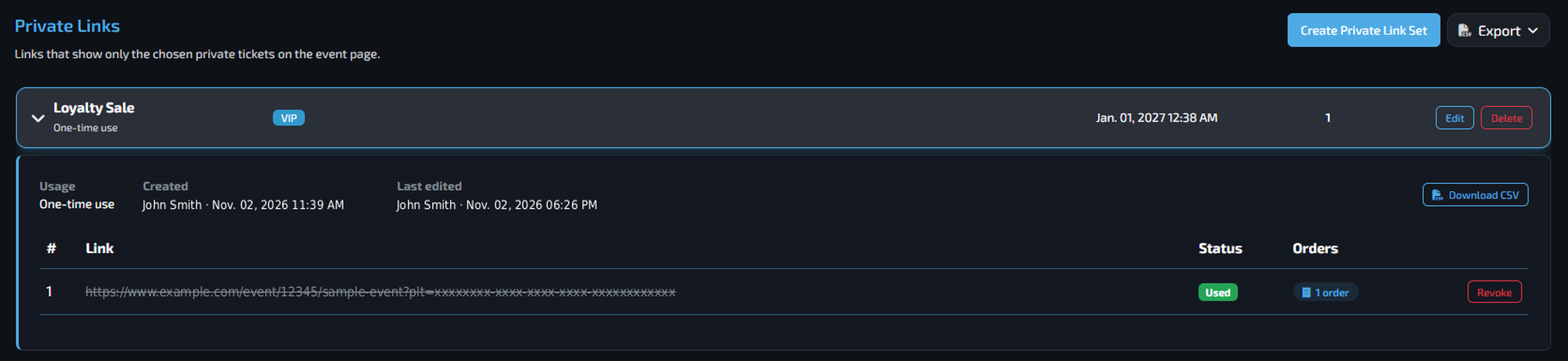
Button | What It Does |
Edit | Updates a Link Set. You can only change the Link Set Name, Expiration Date, and Promo Code. |
Delete | Removes the entire Private Link Set. |
Download CSV | Downloads a spreadsheet of the Link Set's URLs, their statuses, and any order placed through each link. |
Order | Shows the order placed through a link and takes you straight to its order details page. |
Revoke | Stops a link from working, immediately and for good. Orders already placed through it are not affected. |
Export Private Link Report | Shows a summary for each Link Set: how many links are used, released, expired, revoked, and so on. |
Link Statuses
Status | What It Means |
Created | The link is ready to share. |
Released | The order placed through the link failed or was declined, so the link is free to use again. |
Expired | The link's expiration date has passed. |
Revoked | An admin or the organizer manually turned off the link. |
Used | Order has been placed through that link. Click the Order button next to it to see the order details. |
FAQs
Can I add more links or products to a Link Set after I create it?
No. Editing a Link Set only lets you change its name, expiration date, and promo code. To offer different products or more links, create a new Link Set.
What if I need more than 100 links?
Create another Link Set. Each Link Set holds up to 100 links, and you can create as many sets as you need.
Can I still sell private tickets through POS or Box Office?
No. A product must be removed from the POS and Box Office channels before it can be set to Private.
Can I switch a Link Set from one-time use to reusable later?
No. One-time use can't be changed after the Link Set is created. Create a new Link Set with the setting you need.
Can I stop one link without affecting the rest of the set?
Yes. Click Revoke on that link only. The other links in the set keep working. Use Delete only if you want to remove the entire Link Set.
Can I change the discount after I've shared the links?
Yes. Click Edit on the Link Set and update the promo code. You don't need to send new links, because the code shares the same link as the private sale.